

Video Doorbell


General Queries
It's below the device and the mac address is on app. Go to hamburger menu and Click on 'My Devices' >> Video Door Bell settings >> Device. By clicking on Device, you will get the mac address of the device
No, Qubo Video Door Bell doesn't have in-built battery.
QUBO Video Door Bell is weather and water resistant and can be used outdoor or Indoor.
Connection and Commission
The device can be commissioned using Mobile Hotspot but it performs best with a stable 2Mbps network. Hence, it's advised to switch to a Wi-Fi network once it is commissioned.
Make sure you are using a hotspot from another mobile. Device shall not be commissioned If you are using the same mobile through which you had given the hotspot.
- Go to app settings and scroll down to "Wi-Fi update".
- Press the reset button for 2 seconds and release.
- Once the LED starts blinking on the device, now choose the Wi-Fi network to which you want your device to be connected.
- Scan the QR code, after that and wait for around 10 seconds for completion.
Qubo Account, Access to Device, Installation and Reset
Follow the below procedure:
Hard reset
- Switch off the Tamper Alert for Video Door Bell from Qubo App.
- Open Video Door Bell from upper screw.
- Use Reset PIN and Press reset button provided below the device
- Press it for 10 Sec.
Please note, factory reset will make your device into its original system state by erasing all the previous information stored on the device in an attempt to restore the device to its original manufacturing settings.
There can be multiple reasons that your VDB becomes offline. Below are some conditions:
- Poor Wi-Fi Connectivity
- No Power/Electricity
- Loose Adapter Connection
There could be multiple issues. Below are some of them:
- Device is in offline mode may be because device is switched off or there is no internet connectivity
- Poor Internet connectivity on mobile
- Notifications are set to Mute in the Android/iOS mobile setting
- If the Qubo App notifications are disabled from android/iOS for specific device
- If the Qubo App Notifications are disabled from Android/IOS Settings
Camera Centric
The Smart Video Doorbell's angle of view is 140° diagonals.
- Check QUBO Video Door Bell lens for dirt, dust, spider webs, etc. Clean the lens with a soft and clean cloth. Do not use harsh cleaners or aerosol cleaners that may harm the lens.
- Make sure the QUBO camera is not too far from the router. Also, check for downloading and uploading speeds are more than 2Mbps on mobile and camera respectively
Routines/Use Cases
Routines/UseCases
- You can monitor your Main Door via 24*7 live feeds to your connected device
- You can trigger alarm remotely
- You can use zone fencing for safety & security of your car
- Two-way audio enables you to talk to your family members by pressing push to talk button
Subscription
App
You can program it through modes available on Application. You have to apply routines as per the requirement. There are three modes available on the app:
- Home
- Away
- Night Mode
Alexa/Google Assistant
Yes, this device works with Amazon Alexa as well as Google Assistant. Some of the examples are:
Alexa, Show Camera (Name of the Video door bell)
OK Google, Show Camera (Name of the Video door bell)
Storage
Yes, you can expand the memory for storage up to 128 GB SD card. Cloud storage is a service model in which data is maintained, managed, backed up remotely and made available to users over a network.
You can retrieve your past Videos as per the data storage you have.
Device's Safety
- Avoid keeping the device near wet surface/area like sink or Vase.
- Please keep the device on flat, non-slippery surface (physical damage).
- Use only dry cotton cloth to clean it. Do not wipe it with anything aggressive or harsh chemicals.
- Do not expose it to steam or extreme heat or cold (0-50 degree Celsius). Do not keep it near any heat resource such as heater or stove
- Use accessories recommended by QUBO only.
- These products & services are not meant to be explored by anyone under the age of 18.
Chime
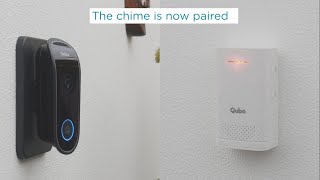
The chime bell is already paired with Qubo Video Door Bell. In case you need to pair the chime bell for some reason then use below steps:
- Press the Auto Learning key
- Press the Door Bell Button
- The Chime is now Paired
There could be multiple reasons. Please check below:
- Check for batteries, replace them and try again.
- Check if your device is paired with Door Bell
- Check your app if the Chime is off from Settings


