

Smart Door Lock Rim Ultra

About Orders
Standard
A factory reset erases all guest and owner data from your lock, restoring it back to its original, out-of-the-box settings. It also removes the lock from any owner or guest keychains that it is affiliated with. To complete reset a Qubo Smart RIM Lock that is being used with the Qubo app you must remove the lock from the app and physically reset the app.
- Open the Qubo App and go to the lock screen, which is the screen that shows you whether your door is locked or unlocked.
- Select the Settings menu
- Scroll to factory reset.
- Select Reset Door Lock.
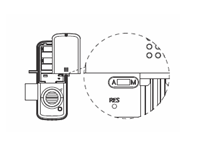
- Open battery cover and find reset button
- Double click [RES] button, the voice prompt "Restored to factory settings" Change Master Pin code.
- After that all user data and settings will be deleted.
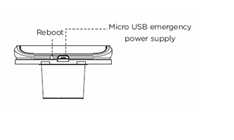
Go to Qubo app and open the Door lock you wish to reboot click on settings and find reboot option to restart the lock.
Press the reboot button provided on the front panel to restart the lock manually, no user data shall be deleted in this operation.
Please follow below instructions:
- Open the Qubo App and go to the lock screen, which is the screen that shows you whether your door is locked or unlocked.
- Select the Settings menu
- Scroll to Change Master PIN
- Change master PIN and click confirm
You can check this through Qubo App, please follow below simple steps:
- Open the Qubo App and go to the lock screen, which is the screen that shows you whether your door is locked or unlocked.
- Select PIN Code
- Select user for which you are looking for PIN code
- You have the PIN code on your smart phone screen
Yes, you can do that. Please follow below steps:
- Open the Qubo App and go to the lock screen, which is the screen that shows you whether your door is locked or unlocked.
- Select Access Card
- Select user for which you are looking to remove access card
- Remove the card


