

Door Lock OPTIMA Black

About Orders
No, device does not have app connectivity.
In case you forgot your Master Pin, you need to reset the lock and setup Master pin and all the users again. It is recommended to please note down the Master Pin.
To Reset follow below steps:
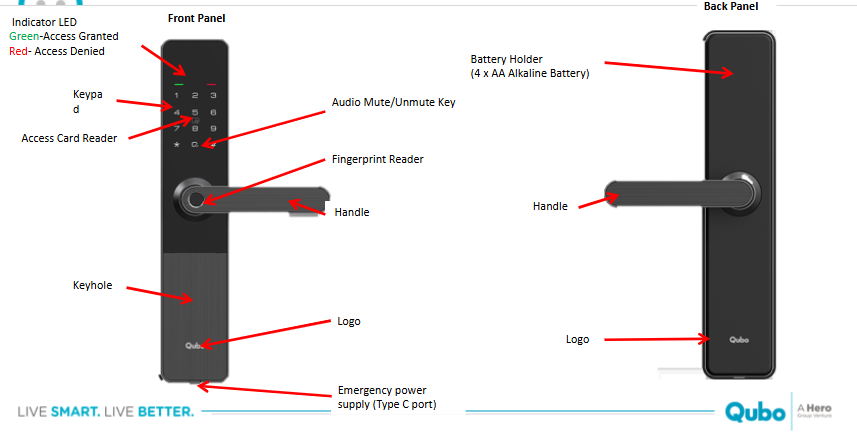
Open the back panel. Double press the Reset button (using pin) swiftly 2 times to manually factory reset the lock.
(*A factory reset erases all guest and owner data from your lock, restoring it back to its original, out-of-the-box settings.)
In smart door locks allows the door to remain unlocked for a set period, enabling free entry and exit without needing to unlock it each time.
To enable same follow below steps:
- Step 1: Wake up touchscreen keypad with palm.
- Step 2: Press [*] twice, input master PIN code and press [#] to confirm.
- Step 3: Press 6, Passage Mode is Enabled.
To disable same follow below steps:
- Step 1: Wake up touchscreen keypad with palm.
- Step 2: Press [*] twice, input master PIN code and press [#] to confirm.
- Step 3: Press 6, Passage Mode is Disabled.
Note: While lock is in passage mode, if someone uses normal access method to unlock the door (registered fingerprint/pin/access card), Passage mode gets disabled.
The available access methods are:
- Fingerprint Access (Capacity: 100)
- Pincode Access (Capacity: 1 Master + 20 others)
- Access Card (Capacity: 100)
- Mechanical Key (2 keys included)
The Qubo Smart Door Lock has several security features including:
- Intruder Safe (Brute Force Alarm) that triggers an alarm and locks the door for 150-180 seconds if someone unsuccessfully attempts to unlock the door 4 times within 5 minutes.
- High Strength Steel Bolt made of 6068 grade steel.
- Low Battery Alerts to notify users when the battery is getting low.
- Voice Guidance for user assistance.
The Jumpstart Battery feature allows users to power the lock via an external power source through a Type C port if they forget to change the battery in case if the battery is completely drained out and the user is stuck outside.
Regular cleaning of the front and back panels with a soft, dry cloth is recommended. Avoid using harsh chemicals or abrasive materials. For the fingerprint sensor, gently wipe with a microfiber cloth if needed.
If the lock freezes or stops responding, try performing a soft reset by removing and reinserting the batteries or using the emergency power port. If the problem persists, contact our customer support team on +91 8766205724.
When battery percent is lower than 20%, you will get a voice prompt on door lock "Low battery please replace all batteries" at each unlocking the Lock.


